satur
DiscordDisplay colour control for Rust on Windows 10 and 11.
What it does
- Stronger colours in Rust: saturation up to 300% and NVIDIA or AMD Vibrance, with five looks to start from.
- Dark Boost on a key: lights up the night, or clears the haze underwater.
- Zoom on a key: 2x, 3x or 4x.
Your look turns on when Rust is in front and off when you alt-tab.
See the difference
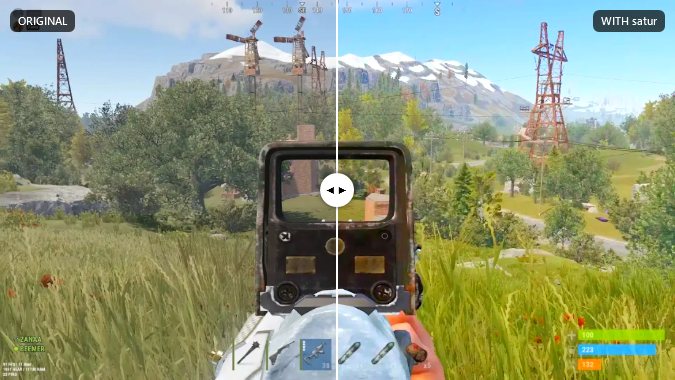
The Competitive look: stronger colours, so players stand out from grass and trees.
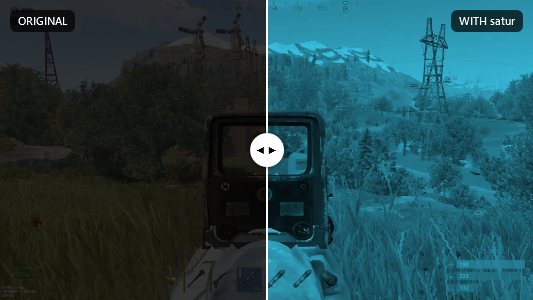
Dark Boost at night, while you hold your key: the dark lights up in one colour (here Cyan).

Zoom while you hold your key: the middle of the screen at 2x, 3x or 4x.
Safe to try
- Colour only. satur changes Windows' display colour settings and NVIDIA or AMD Vibrance, the same settings your driver's control panel has.
- It never touches Rust. No injecting, no hooks, no reading its memory, no drawing over the game.
- No keyboard or mouse hooks. It only checks whether its own hotkeys are pressed.
- No admin rights, no account, nothing else installed.
- Easy to undo. Ctrl+Alt+Shift+R puts normal colours back at once, and uninstalling removes it.
Only download satur from this page or our Discord. Copies from anywhere else may not be ours.
Why the code is scrambled: satur's program file is obfuscated so nobody can easily copy it, strip out the key check and pass off a changed copy, possibly with malware inside, as satur. That protects you as much as us.
Want to check the code yourself? DM me, Andreas, personally on Discord:
4q0o
(ID 1002932419688665129). If you genuinely understand
code, I'll show you satur's source code so you can see for yourself there's no malware in it.
Anti-cheat and server rules
Anti-cheat: satur never touches Rust, so there is nothing in the game for Easy Anti-Cheat to find. It works like the colour settings in your graphics driver.
Server rules: some servers don't allow brightness or night-vision tools, and their admins may ban you from their server if you abuse Dark Boost or zoom, for example to spot players at night in a way that's clearly unnatural. Check each server's rules and play fair.
Download
You need Windows 10 or 11 and an NVIDIA or AMD graphics card. Download first, then request your free key below.
Download satur 2.2.2SHA-256 of the installer:
26bd110e7e1e6fc30afd19b82c4d6a41a80b90409dec875c76aecd042c093d4e
To check your download, open PowerShell in the folder it's in and run
Get-FileHash satur-Setup.exe. The result must match the line above. If it doesn't, don't run the file.
Virus scan by about 70 antivirus programs: VirusTotal report for this installer. Microsoft Defender and the other major antivirus programs report it clean. One or two small scanners may flag it as "obfuscated": satur's code is scrambled so it can't be copied, and those scanners guess from that alone, not from anything the program does.
Windows will probably say "Windows protected your PC", because satur isn't code-signed. Click More info, then Run anyway. The first install may fetch about 75 MB of .NET from Microsoft. It installs for your Windows user only and never asks for admin rights.
Your free weekly key
All features are free during the initial rollout. Each approved key lasts 7 days.
- Install satur and open it. It asks for a key and shows your PC code (like 1A2B-3C4D).
- Copy the PC code. Join our Discord: https://discord.gg/andreas
- In Discord, use
/requestkey pc:YOUR-PC-CODE. Andreas reviews each request. - The bot sends your approved key by private message. Paste it into satur and click Activate.
Your seven days start when the key is issued. From 3 days after that, use /requestkey
again for next week's key, so there's no gap. There is no automatic renewal. The key works only on your PC.
DMs closed or lost your key? Run /requestkey again and choose Show my key for a private reply.
For a replacement PC, ask Andreas. Never post your key in a channel.
What satur sends
- Your key, to satur's server, every 30 minutes: to check it still works and to look for updates. The server notes which satur version the key runs, the day it was last used and a scrambled form of the network it came from (kept 7 days), to spot keys that are shared.
- Error reports, when satur hits an error: its settings, state and log. Never your key itself, your Windows user name, your PC's name or your files. You can switch automatic reports off under Settings → Help.
satur has no account and nothing else leaves your PC.
Questions
- The colours don't show in Rust.
- Set Rust's screen mode to Borderless or Windowed. In exclusive fullscreen Windows skips the colour filter.
- The screen looks wrong.
- Press Ctrl+Alt+Shift+R. That puts normal colours back and turns satur off. Running "satur.exe --reset" does the same.
- The screen flickers.
- Close other colour tools such as vibranceGUI. Two programs setting the colours fight each other.
- satur says it needs the internet.
- It has to reach its server at least once every 3 days, so a cancelled key or a required update can't be missed.
- satur says I must update.
- Some updates are required. Click Update now: it closes, updates and reopens by itself, and your settings stay.
- My key stopped working.
- It ran out, was cancelled, or was made for a different PC. The key window says which. Ask for a new one with your PC code.
- How do I remove it?
- Windows Settings → Apps → satur → Uninstall. Your looks stay in %AppData%\satur; delete that folder to remove them too.